Showing posts with label Learn MongoDB. Show all posts

Friday, February 14, 2014

MapReduce in MongoDB

MapReduce is one of the approaches to perform aggregate calculation in MongoDB. The other two methods are Aggregate Pipeline and Single Purpose Aggregation. MapReduce as its name says has two functions – map function and reduce function.

If you are aware of functional programming, the map() function is to segregate the elements from a list or segregate rows from a table by applying sorting and filtering. The main aim of map() function is to take each of the document/item from collection/list and convert them into a key, value pair. Thus mapping each document/item with a {key, value} pair.

The aim of reduce() function is take each key, value pair from map function and consolidate all the values by grouping them by key. Next the user defined logic is applied to the consolidate values of each key.

The life cycle of a mapReduce function is shown here.

To show the life cycle of a mapReduce function let us take an example of collection and see how mapReduce works. How data gets segregated and processed during the life cycle.

The table shows data of employee table. We want to see aggregate total of salary paid by each of the department.

{ "EmpName" : "Sam Pitroda", "Age" : 35, "Salary" : 3126, "Gender" : "M", "Dept" : 10 }
{ "EmpName" : "Bill Rama", "Age" : 48, "Salary" : 2270, "Gender" : "M", "Dept" : 10 }
{ "EmpName" : "Supriay Khanna", "Age" : 32, "Salary" : 3066, "Gender" : "F", "Dept" : 10 }
{ "EmpName" : "Pappu Kaun", "Age" : 24, "Salary" : 4133, "Gender" : "M", "Dept": 10 }
{ "EmpName" : "Akshay Kumar", "Age" : 22, "Salary" : 2651, "Gender" : "M", "Dept" : 10 }

{ "EmpName" : "Anil Shastri", "Age" : 48, "Salary" : 2724, "Gender" : "M", "Dept" : 20 }
{ "EmpName" : "Ajay Khanna", "Age" : 49, "Salary" : 3711, "Gender" : "M", "Dept" : 20 }
{ "EmpName" : "Steve Allan", "Age" : 29, "Salary" : 4391, "Gender" : "M", "Dept" : 20 }
{ "EmpName" : "Jayant Singh", "Age" : 31, "Salary" : 2931, "Gender" : "M", "Dept" : 20 }
{ "EmpName" : "Saurab Khanna", "Age" : 39, "Salary" : 2566, "Gender" : "M", "Dept" : 20 }

{ "EmpName" : "John Butler", "Age" : 45, "Salary" : 3622, "Gender" : "M", "Dept" : 30 }
{ "EmpName" : "Ismail Paun", "Age" : 32, "Salary" : 3608, "Gender" : "M", "Dept" : 30 }
{ "EmpName" : "Rahul Puri", "Age" : 32, "Salary" : 2111, "Gender" : "M", "Dept": 30 }

{ "EmpName" : "Srini Arya", "Age" : 30, "Salary" : 3966, "Gender" : "F", "Dept": 40 }
Input
{ "Salary" : 3126, "Dept" : 10 }
{ "Salary" : 2270, "Dept" : 10 }
{ "Salary" : 3066, "Dept" : 10 }
{ "Salary" : 4133, "Dept": 10 }
{ "Salary" : 2651, "Dept" : 10 }

{ "Salary" : 2724, "Dept" : 20 }
{ "Salary" : 3711, "Dept" : 20 }
{ "Salary" : 4391, "Dept" : 20 }
{ "Salary" : 2931, "Dept" : 20 }
{ "Salary" : 2566, "Dept" : 20 }

{ "Salary" : 3622, "Dept" : 30 }
{ "Salary" : 3608, "Dept" : 30 }
{ "Salary" : 2111, "Dept": 30 }


{ "Salary" : 3966, "Dept": 40 }
Map
{ "key" : 10, Values: (3126, 2270, 3066, 4133, 2651)}
{ "Key" : 20, Values:(2724, 3711, 4391, 2931, 2566,)}
{“Key”:30, Values:( 3622, 3608, 2111)}
{ "Key" : 40, Values:( 3966)}}
Reduce
{ "_id" : 10, "value" : 15246 }
{ "_id" : 20, "value" : 16323 }
{ "_id" : 30, "value" : 9341 }
{ "_id" : 40, "value" : 3966 }
Output

In MongoDB to apply mapReduce() method the syntax is following:


db.collection_name.mapReduce(
map_function() {..., emit(key, value);},
reduce_function(key, value) {..., return (...)},
{out: "output_collection_name"}

To apply mapReduce() to get sum total of Salary of each department we can issue following command on MongoDB shell.

db.employee.mapReduce(
   function(){emit(this.Dept,this.Salary);},
   function(key,values){return Array.sum(values)},
    {
    out:"DeptSalary"
   }
)


Monday, February 10, 2014

3 Free Online Tools to learn and Experiment with MongoDB .

Today I am sharing three free online tools that you can use to learn and experiment with MongoDB. You do not need to download or install anything on your desktop or laptop to experiments with these tools. These are available online and all your need is a computer and a good internet connection.

Query Translator

www.querymongo.com

Do MongoDB

http://domongodb.com/mongodbconsole.aspx

This is a great initiative and it is a free online platform to learn and explore MongoDB online. You need to login with your name and email address and it create a database for you. You can explore MongoDB commands and try some of the basic features here.

Try MongoDB Shell

http://try.mongodb.org/

This is an online browser based shell provided by the creator of MongoDB (MongoDB, Inc). It has by default "test" database available. You can learn about creating collection (table), reading data from collection and other basics stuff from here.

If you know any online tool to learn and explore MongoDB which is not listed here; please share with us.

Saturday, February 8, 2014

Aggregate in MongoDB

Aggregate are use to perform calculation or operation on a group of values from multiple documents (rows). The outcome of an aggregate function is one computed single value.

In SQL Server 2012 a popular RDBMS system we have following aggregate function available.

-    AVG
-    MIN
-    CHECKSUM_AGG
-    SUM
-    COUNT
-    STDEV
-    COUNT_BIG
-    STDEVP
-    GROUPING
-    VAR
-    GROUPING_ID
-    VARP
-    MAX

In MongoDB we can perform the aggregate function using three different approaches.

1.    Aggregation Pipeline
2.    Map-Reduce
3.    Single Purpose Aggregation

Aggregation Pipeline

Aggregation Pipeline method is a framework for performing aggregate task. Technically, MongoDB passes the documents (rows) of a single collection (table) through a pipeline. The data is processed in each of the pipe and outcome is handed over to next pipe and at the end the computed result is returned. This approach uses “aggregate()” method provided by MongoDB.

The syntax to use Aggregate Pipeline approach is following:

db.collection_name.aggregate(group_by_field_name, [matching_criteria])

For example let us consider we have following employee data.

To add data into MongoDB we can issue following command on MongodB shell. This will create a employee collection (table) and insert all the documents (rows) into it.

db.employee.insert(
[
{EmpName:'Sam Pitroda',Age:35,Salary:3126,Gender:'M',Dept:10},
{EmpName:'Anil Shastri',Age:48,Salary:2724,Gender:'M',Dept:20},
{EmpName:'Bill Rama',Age:48,Salary:2270,Gender:'M',Dept:10},
{EmpName:'John Butler',Age:45,Salary:3622,Gender:'M',Dept:30},
{EmpName:'Srini Arya',Age:30,Salary:3966,Gender:'F',Dept:40},
{EmpName:'Ajay Khanna',Age:49,Salary:3711,Gender:'M',Dept:20},
{EmpName:'Supriay Khanna',Age:32,Salary:3066,Gender:'F',Dept:10},
{EmpName:'Ismail Paun',Age:32,Salary:3608,Gender:'M',Dept:30},
{EmpName:'Akshay Kumar',Age:22,Salary:2651,Gender:'M',Dept:10},
{EmpName:'Steve Allan',Age:29,Salary:4391,Gender:'M',Dept:20},
{EmpName:'Rahul Puri',Age:32,Salary:2111,Gender:'M',Dept:30},
{EmpName:'Jayant Singh',Age:31,Salary:2931,Gender:'M',Dept:20},
{EmpName:'Saurab Khanna',Age:39,Salary:2566,Gender:'M',Dept:20},
{EmpName:'Pappu Kaun',Age:24,Salary:4133,Gender:'M',Dept:10}
]
)

We will use Aggregate Pipeline approach to read total salary of Dept 10.

$sum

To read sum total of salary for each of the department we can write aggregate function like this:

db.employee.aggregate({$group: {_id:"$Dept", TotalSalary:{$sum : "$Salary"}}})

To read sum total of salary for one specific department (Dept 20) we can write aggregate function like this:

db.employee.aggregate({$group:
      {_id:"$Dept",TotalSalary:{$sum : "$Salary"}}},
      {$match:{_id:{$lt:20}}})

$avg

To get the average salary of all the departments we can write following aggregate function on MongoDB shell.

db.employee.aggregate({$group:{_id:"$Dept", TotalSalary:{$avg : "$Salary"}}})

$first, $last

To get the Maximum and Minimum salary from each Dept, we can write following command in MongodB shell.

db.employee.aggregate({$sort:{Salary:1}},{$group:{_id:{Dept: "$Dept"},MaxOfSalary:{$first: "$Salary"},MinOfSalary:{$last: "$Salary"}}})

Thursday, February 6, 2014

How to rebuild Indexes in MongoDB?

In case you want to rebuild your Index MongoDB provide the reIndex() method to do so. Sometime due to large data insertion or operation we need to rebuild the index. The syntax to rebuild all the index on a collection (table) is following:

db.collection_name.reIndex()

For example to rebuild all the Indexes of scores collection (table) we can issue the following command to MongoDB shell

db.scores.reIndex()

If you want to rebuild one specific index of collection you can use the below syntax:

db.collection_name.reIndex({field_name:1 or -1,field_name2: 1 or -1})

For example to rebuild index Smpname_1_Salary_-1 from employeeList collection we can pass the following command to MongoDB shell:

db.employeeList.reIndex({EmpName:1,Salary:-1})


How to remove all the Indexes from a MongoDB Collection (table)?

To remove all the Indexes from a collection (table) MongoDB has provided following syntax:

db.collection_name.dropIndex()

To remove one particular index from a collection (table) MongoDB has provided following syntax:

db.collection_name.dropIndex({field_name:Sorting_order(1 or -1))

For example to drop index “scores” from scores collection (table) we can issue following command:

db.scores.dropIndex({“score”:1})


What is MongoDB?
How to get Started with MongoDB
How to create or drop Database in MongoDB?
How to create Collection (Table) in MongoDB?
... More

Sparse Indexes in MongoDB

MongoDB provide flexibility of dynamic fields (columns) for each of the document (row). Unlike in RDBMS or DBMS system where each row has fixed set of columns. In MongoDB each of the documents (row) can have their own set of columns. So it is not mandatory that the two rows will have same columns. This is the beauty of NoSQL database MongoDB.

Sparse Indexes are special kind of indexes which stores references of only those documents (rows) which include the index field. So, if rows do not have the field which is marked in Sparse Index it will not be part of the Index. This saves a lot of disk space.

The syntax to define Sparse Index is following:

db.collection_name.ensureIndex( { Fieldname: 1 or -1 }, { sparse: true /false} )

For example, we have created collection (table) named "Productivity" where documents (rows) have different field. Some documents (rows) do not have Manufacturer field.

Now we will create a Sparse Index on Manufacturer field. We can do this by passing following command.

db.Products.ensureIndex({Manufacturer:1},{sparse:true})


Wednesday, February 5, 2014

TTL (Time to Live) Indexes in MongoDB

Time To Live or TTL indexes are special kind of indexes which remove the expired documents (rows) from collection (tables) after a fix time. MongoDB provide this feature by which you can create Index which will take care of removing documents (row) after a certain time is passed in the background.

To create a TTL Index the syntax is following:

db.collectionname.ensureIndex ({fieldname:1 OR -1},{expireAfterSeconds: timeinseconds})

For example to create TTL index on empCalendar collection (table) on CreatedOn filed we can write following command. With this, we have created an Index which will start removing all the documents (row) where value in CreatedOn filed will be less than the (current time + 5 minute).

db.empCalendar.ensureIndex({"CreatedOn":1},{expireAfterSeconds: 300})

I created this Index on 4th Feb. As you can see in the below screen we have two documents where value of CreatedOn field is in future. MongoDB will delete all the documents except the two where CreatedOn value is a future date after 5 minutes.

Only two records were left in the Collection (table) after 5 minute.

With TTL Index we can also set a fix time or fix clock after which each of the document will be removed from the Collection.

To understand this let us take an example. We have following data in empCalendar collection.

As you can see each of the documents has their own CreatedOn field which holds a date and time. To create a TTL Index which will remove each of the document in this collection after date and time in CreatedOn is passed, we can issue below command.

db.empCalendar.ensureIndex({"CreatedOn":1},{expireAfterSeconds:0})

There are certain limitations with TTL Index

  • TTL Index can be created on field which stored date values
  • TTL Index cannot be created on multiple fields
  • If a field already has an existing index, TTL index cannot be created on that.
  • The _Id() field does not support TTL Indexes.


Geospatial Index in MongoDB

With MongoDB you can store Geospatial Information i.e. information about location in co-ordinates, longitude and latitude etc. MongoDB allows you to create indexes on Geospatial data.

MongoDB supports two type of Geospatial Index. But, MongoDB allows only one Geospatial Index per collection (table).

1.     2d Indexes
2.     2sphere Indexes

2d Indexes: When the data is stored as legacy coordinate pairs to support planar geometry in the fields, MongoDB allows to create 2d Indexes. To create a 2d sphere Index the syntax is following:

db.Collection_name.ensureIndex({location_field}: “2d”, additional_field: value}, {index-specification options})

2d Sphere Indexes: When the data is stored to support spherical geometry as longitude and latitude in the fields, MongoDB allows to create 2d Sphere Indexes. To create a 2d sphere Index the syntax is following:

Db.Collection_name.ensureIndex({location_field}: “2dsphere”})


Text Indexes in MongoDB

Text Indexes are created on fields (columns) which stores string data. Text indexes can be created on one field (column) or multiple fields (Columns). This index is useful when you are searching in the string data type columns.

MongoDB create only one text index per collection (table). Also, Text indexes are case-sensitive in MongoDB.

Before we create Text Indexes we need to enable the textSearchEnabled. To enable the textSearchEnable we need to issue the following command when we are launching mongoDB.

mongod.exe -dbpath "C:\data" --setParameter textSearchEnabled=true

To create Text Index on a field (column) we can use following command:

db.collectio_name.ensureIndex({field_name:"text"})

For example we have created Text Index on Quotes field in famousQuotes collection (table)

db.famousQuotes.ensureIndex({Quotes:"text"})

To create Text Search Index on all string data type fields (columns) of a collection (table), we can use following syntax:

db.Collection-name.ensureIndex({"$**":"text"},{name:IndexName})

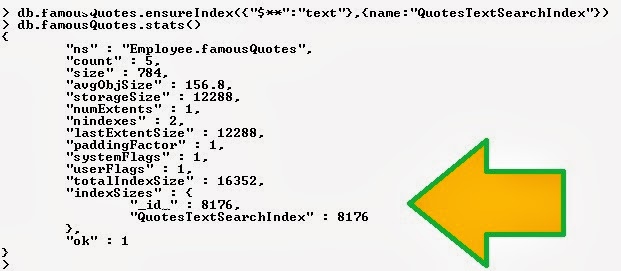
For example the following command will create Text search Index on all string data type fields of famousQuotes collection (table)

db.famousQuotes.ensureIndex({"$**":"text"},{name:"QuotesTextSearchIndex"})


Array or MultiKey Index in MongoDB

MongoDB allows you to create index on fields (columns) which stored values in arrays form. For each of the item in Array list MongoDB create a corresponding entry in index.

For example we have created StateZipCode collection and created Array Index for ZipCode field.

Compound Index in MongoDB

Compound Indexes are created on two or more columns. MongoDB allows up to 31 fields which can be included in the compound index. Technically with Compound Index one single index store reference of multiple fields. To create Compound Index the syntax is following:

db.collection_name.ensureIndex({field_name1:Sorting_order, field_name2: Sorting_order}, {parameters})

Sorting_order could be Ascending (1) or Descending (-1). By putting the sorting_order you are telling MongoDB to create a unique index on the field and store the value in a specific order.

For example:

To create Compund Index for employeeList collection (table) we can issue following command:

db.employeeList.ensureIndex({"EmpName":1,"Salary":-1})

Here we are creating compound Index on two fields – EmpName and Salary.


Unique or Single field Index in MongoDB

Unique or Single field indexes are created on one field (column) of Collection (table). To create a Unique or Single field index the syntax is following:

db.collection_name.ensureIndex({field_name:Sorting_order }, {parameters})

Sorting_order could be Ascending (1) or Descending (-1). By putting the sorting_order you are telling MongoDB to create a unique index on the field and store the value in a specific order. Unique Index does not allow duplicate entries in the field (columns).

For example:

To create Unique Index for deptdetails collection (table) we can issue following command:

db.deptdetails.ensureIndex({"DeptName":1})

Indexes in MongoDB

Like other RDBMS system such as Oracle, SQL Server, DB2 etc. MongoDB provide support for Indexes. Indexes are mainly use for faster performance of read operations. As you now Collection (table) holds the data in MongoDB. Every time we wish to query the data in collection we ask MongoDB to scan all the data and return it to us. Scanning all the data is time consuming process. The more data the collection (table) holds, the more time it takes to read the data.

Indexes come to help here. Indexes stores small part of large data set stored in collection (table) in an order list.

In MongoDB there are two type of Index

1.     System Defined Index
2.     User Defined Index

System Defined Index

MongoDB by default add _Id() index in all the collection (table). The _Id() field is a unique index. A unique index does not allow duplicate value in the field. The _Id() field is stored with each of the document (row) in a Collection (table). A user cannot drop or delete the _Id() index. The default value in this field is an ObjectID. It is a by default added Primary key by MongoDB in every Collection.

So, every time we issue an Insert() method to add document into collection, MongoDB ensue that document is stored with a _Id() field.

User Defined Indexes

MongoDB has provided 6 user defined indexes which can be created by the users as per their requirement.

1.    Unique Index
2.    Compound Index
3.    Array Index
4.    Time to Live (TTL) Index
5.    Text Index
6.    Geospatial Index


Wednesday, January 29, 2014

RDBMS and MongoDB cheat sheet

In this post I am going to share the RDBMS and MongoDB CheatSheat. If you come from RDBMS (Oracle, SQL Server, DB2 etc.) background, this will help you for your quick reference.

You can also download the cheat sheet here

RDBMS MongoDB
Database Database
Table Collection
Row Document
To create Database

CREATE DATABSE database_name(…)
To create Database

use database_name
To drop Database

DROP DATABSE database_name
To drop Database

use databasename
db.dropDatabase()
To create Table

CREATE TABLE table_name (…)
To create collection

db.createCollection(collection_name)
OR
db.Collectio_Name.Insert(…)
To drop Table

DROP TABLE table_name
To drop Collection

db.collectioname.drop()
To see all the records of a table

SELECT * FROM tablename
db.collectionname.find()
To see all the database

SELECT name, database_id, create_date
FROM sys.databases
show dbs
To add records in table

INSERT INTO tablename Values(value1, value2 …)
db.collectioname.insert({key1:value1,key2:value2,…})
To Delete all records of a table

Truncate Table tablename
db.collectioname.remove()
To Delete specific records of a table

DELTE FROM tablename WHERE condition
To Delete specific records of a collection

db.collectioname.remove(Deletion_Criteria)
To update records

UPDATE table_name SET …
To update documents
db.collectioname.update(selection_criteria, new_data)
Logical Operators in RDBMS

- AND
- OR
- ANY
- BETWEEN
- LIKE
- IN
- NOT
- ALL
Logical Operators in RDBMS

- AND = {,}
- OR = $or:[ ... ]
Comparison Opeators in RDBMS

= (Equal)
< (Less than)
<= (Less than or equal to)
> (Greater than)
>= (Greater than or equal to)
!= (Not equal to)
Comparison Opeators in MongoDB

:
$lt
$lte
$gt
$gte
$ne

Logical Operators in MongoDB.

In this post we will explore the Logical operators of MongoDB. Just like RDBMS such as Oracle, SQL Server, DB2 have logical operators, MongoDB has its own set of Comparison operators.

RDBMS Logical Operators MongoDB Operator
AND {,}
OR $or:[ ... ]

Let us see example of MongoDB operators.

AND operator

In MongoDB the key/vaue pair passed into a curley braces ({...}) and separated by comma (,) act as AND logical operator. For example to read document (Row) from deptdetails (table) collection using AND operator we can write following command.

db.deptdetails.find({DeptCode:30,DeptName:"Accounts"}).pretty()

Here we are reading data where DeptName is Accounts AND DeptCode is 30.

OR operator

MongoDB has provided $or for OR operator. They key/value pair inside $or[ … ] is use to pass separate expression values. For example to read data from deptdeails collection (table) where DeptName is HR or DeptCode is 30 we can write the statement like this

db.deptdetails.find(
{
$or:
[
{DeptCode:30},
{DeptName:"HR"}
]
}
).pretty()

What is MongoDB?
How to get Started with MongoDB
How to create or drop Database in MongoDB?
How to create Collection (Table) in MongoDB?
... More

Comparison operators in MongoDB

In this post we will explore the Comparison operators in MongoDB. Just like RDBMS such as Oracle, SQL Server, DB2 have their comparison operators, MongoDB has its own set of Comparison operators.

RDBMS Operator MongoDB Operator
= (Equal) :
< (Less than) $lt
<= (Less than or equal to) $lte
> (Greater than) $gt
>= (Greater than or equal to) $gte
!= (Not equal to) $ne

Let us see example of MongoDB operators.

Equal (:)

Here is an example of Equal(:) operator. We are reading data from deptdetails collection where DeptName is equal to Admin.

db.deptdetails.find({DeptName:"Admin"}).pretty()

Less than ($lt)

Here is example of less than($lt) operator. We are reading all the document (row) from deptdetails collection (table) where deptcode is less than 30.

db.deptdetails.find({DeptCode:{$lt:30}}).pretty()

Greater than ($gt)

Here is example of greater than($gt) operator. We are reading all the document (row) from deptdetails collection (table) where deptcode is greater than 30.

db.deptdetails.find({DeptCode:{$gt:30}}).pretty()

Not equal to ($ne)

Here is example of Not equal to ($ne) operator. We are reading all the document (row) from deptdetails collection (table) where deptcode is not equal to 30.

db.deptdetails.find({DeptCode:{$ne:30}}).pretty()

Similarly we can use less than or equal to and Greater than and equal to operator.

What is MongoDB?
How to get Started with MongoDB
How to create or drop Database in MongoDB?
How to create Collection (Table) in MongoDB?
... More

How to Read or find document (row) in MongoDB?

In this post we will examine how we can read data from MongoDB collection (table). In RDBMS system such as in Oracle, SQL Server, DB2 etc we use SELECT command to read data from table or views.

In MongoDB we have find() method available which we can use to read data.

To read all data from a collection( table) we can use find() method like this.

db.collectioname.find()

To read all the data from deptdetails collection (table) we can write

db.deptdetails.find()

The use of pretty() method with find() method lets the MongoDB show the data in a formatted way.

limit()

If you want to limit the number of records to be return in MongoDB we can use limit(). This is similar to TOP clauses which are used with SELECT command in PL/SQL or T-SQL with RDBMS. The syntax for this is

db.collectioname.find().limit(number)

For example db.deptdetails.find().limit(2).pretty() will show only two documents (row) from deptdetails collection.

sort()

In PL/SQL or T-SQL we use asc or desc to sort the data in a particular order. To read the document (row) in a ascending or descending order we can use sort() method in MongoDB. The syntax for the same is following:

db.collectioname.find().sort({Key:1 or -1})

1 is for ascending order sorting and -1 is for descending order sorting.

Applying condition with find() method.

By default find () method read the entire document (row) of a collection (table). To read specific data or documents which meet your criteria we can apply conditions with find () method.

db.collectioname.find({key1:value1, key2:value2, ... , keyN:valueN})

The below screen shot shows how we can read data from deptdetails collection by applying condition with find() method.

db.deptdetails.find({DeptCode:30,DeptName:"Accounts"}).pretty()

What is MongoDB?
How to get Started with MongoDB
How to create or drop Database in MongoDB?
How to create Collection (Table) in MongoDB?
... More

How to delete document (Row) in MongoDB Collection (table)?

In this post we will explore how we can delete or remove document (row) from Collection (table) in MongoDB.

To delete document (row) MongoDB has provided remove() method. The remove() method is use to delete rows. You can delete one record or set of records of the entire data from collection(table). The syntax for remove() method is following:

db.collectioname.remove([deleteion_criteria],[justone])

To remove all the document (row) from MongoDB collection (table) we can issue the following command

db.collectionname.remove()

For example purpose let us delete all the record form deptdetails Collection in MongoDB.

To remove or delete records which match a particular condition, we can pass the deletion criteria. For example from the deptdetails table we can remove the document with the value "I am new data here".

Justone

The justone parameter with remove() method is use to tell MongoDB to remove one record or all the records. It has two values. 1 and 0. Setting value 1 will remove only one record.

For example we have two records with DeptCode 20 in deptdetails collection. We have run the remove() command with justone parameter value as 1 and it deleted one record only, as you can see in the below screen.

What is MongoDB?
How to get Started with MongoDB
How to create or drop Database in MongoDB?
How to create Collection (Table) in MongoDB?
... More

Tuesday, January 28, 2014

How to update or save document (Row) in MongoDB Collection (table)?

Today, we will explore how we can update document (row) in MongoDB. To update data we use UPDATE statement in RDBM system. We can update all the rows or only some row by applying WHER clause.

In MongoDB, we have two methods available to update document.
   1. update
   1. save

update() method

To update document (row) in MongoDB we can use following syntax:

db.collectionName.update(Selection_Criteria, New_data_value)

Let us see an example of update. We have Dept collection (table) and we are going to update the name of dept from "Global Finance" to "New Global Finance".

db.deptdetails.update({"_id" : ObjectId("52e711871a7cd793275359de")},{$set:{"DeptName":"New Global Finance"}})

We can apply multiple selection criteria in update statement.

db.deptdetails.update({DeptName : "Admin",DeptCode:50},{$set:{DeptName:"Admin",DeptCode:100}})

In the above statement we are updating DeptName and DeptCode.

By default the update () method updates only one document (Row). If you want to update the entire row which matches the selection criteria than you have to use multi parameter.

db.deptdetails.update({DeptName : "Admin",DeptCode:50},{$set:{DeptName:"Admin",DeptCode:100}},{multi:true})

save() method

save() method is used to replace the document(row). The entire document (row) along with columns will be replaced with the new data. The syntax for save() method is following:

db.collectionName.save({_id:ObjectId(),new_data})

For example we have following data in deptdetails collection (table)

{
    "_id" : ObjectId("52e711871a7cd793275359db"),
    "DeptName" : "Marketing",
    "DeptCode" : 30
}

We can issue the following command to change the entire content of this document (row)

db.deptdetails.save({"_id" : ObjectId("52e711871a7cd793275359db"),"mynewcol":" I am new data here"});

What is MongoDB?
How to get Started with MongoDB
How to create or drop Database in MongoDB?
How to create Collection (Table) in MongoDB?

How to add document (Row) in MongoDB Collection (table)?

In this post we will see how we can add new documents (rows) into MongoDB Collection (table). MongoDB is a document oriented NoSQL database. The terminology of NoSQL is different from RDBMS such as Oracle, DB2, Ms-SQL Server.

A MongoDB collection is equivalent to RDBMS table. Document in MongoDB is equivalent to Rows into RDBMS.

To add a new row in MongoDB collection we use the insert() method. The syntax for the same is

db.CollectionName.insert({key:value,key2:value2,keyN:valueN})

The below example will create a database named “Dept”. A Collection “deptdetails” will be created and we will add document(Row).

use dept
switched to db dept
db.createCollection("deptdetails")
{ "ok" : 1 }
db.deptdetails.insert({DeptName:"Sales",DeptCode:10})
db.deptdetails.find().pretty()
{
 nbsp;nbsp; "_id" : ObjectId("52e6da801a7cd793275359d3"),
nbsp;nbsp;nbsp; "DeptName" : "Sales",
nbsp;nbsp;nbsp; "DeptCode" : 10
}

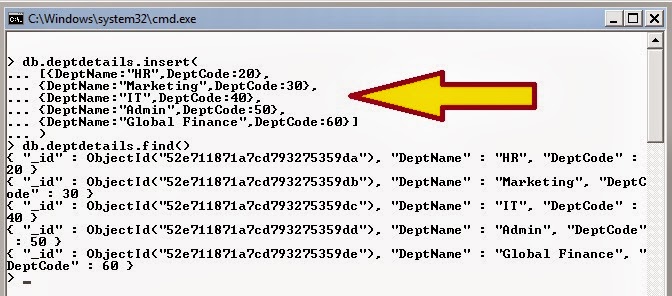
If you want to add multiple documents (rows) at one time you can follow the below syntax:

db.CollectionName.insert(
[
    {key:value,key2:value2,keyN:valueN},
    {key:value,key2:value2,keyN:valueN},
    {key:value,key2:value2,keyN:valueN}
]
)

db.deptdetails.insert(
[{DeptName:"HR",DeptCode:20},
{DeptName:"Marketing",DeptCode:30},
{DeptName:"IT",DeptCode:40},
{DeptName:"Admin",DeptCode:50},
{DeptName:"Global Finance",DeptCode:60}]
)

In MongoDB if you want to read about the stats of a collection you can issue db.CollectionName.stats() command. This will show the collection size, number of documents (row), average object size, index size of the collection.

What is MongoDB?
How to get Started with MongoDB
How to create or drop Database in MongoDB?
How to create Collection (Table) in MongoDB?
How to update or save document (Row) in MongoDB Collection (table)?

Popular Posts

Real Time Web Analytics