Showing posts with label MongoDB Collection. Show all posts

Wednesday, January 29, 2014

Comparison operators in MongoDB

In this post we will explore the Comparison operators in MongoDB. Just like RDBMS such as Oracle, SQL Server, DB2 have their comparison operators, MongoDB has its own set of Comparison operators.

RDBMS Operator MongoDB Operator
= (Equal) :
< (Less than) $lt
<= (Less than or equal to) $lte
> (Greater than) $gt
>= (Greater than or equal to) $gte
!= (Not equal to) $ne

Let us see example of MongoDB operators.

Equal (:)

Here is an example of Equal(:) operator. We are reading data from deptdetails collection where DeptName is equal to Admin.

db.deptdetails.find({DeptName:"Admin"}).pretty()

Less than ($lt)

Here is example of less than($lt) operator. We are reading all the document (row) from deptdetails collection (table) where deptcode is less than 30.

db.deptdetails.find({DeptCode:{$lt:30}}).pretty()

Greater than ($gt)

Here is example of greater than($gt) operator. We are reading all the document (row) from deptdetails collection (table) where deptcode is greater than 30.

db.deptdetails.find({DeptCode:{$gt:30}}).pretty()

Not equal to ($ne)

Here is example of Not equal to ($ne) operator. We are reading all the document (row) from deptdetails collection (table) where deptcode is not equal to 30.

db.deptdetails.find({DeptCode:{$ne:30}}).pretty()

Similarly we can use less than or equal to and Greater than and equal to operator.

What is MongoDB?
How to get Started with MongoDB
How to create or drop Database in MongoDB?
How to create Collection (Table) in MongoDB?
... More

How to delete document (Row) in MongoDB Collection (table)?

In this post we will explore how we can delete or remove document (row) from Collection (table) in MongoDB.

To delete document (row) MongoDB has provided remove() method. The remove() method is use to delete rows. You can delete one record or set of records of the entire data from collection(table). The syntax for remove() method is following:

db.collectioname.remove([deleteion_criteria],[justone])

To remove all the document (row) from MongoDB collection (table) we can issue the following command

db.collectionname.remove()

For example purpose let us delete all the record form deptdetails Collection in MongoDB.

To remove or delete records which match a particular condition, we can pass the deletion criteria. For example from the deptdetails table we can remove the document with the value "I am new data here".

Justone

The justone parameter with remove() method is use to tell MongoDB to remove one record or all the records. It has two values. 1 and 0. Setting value 1 will remove only one record.

For example we have two records with DeptCode 20 in deptdetails collection. We have run the remove() command with justone parameter value as 1 and it deleted one record only, as you can see in the below screen.

What is MongoDB?
How to get Started with MongoDB
How to create or drop Database in MongoDB?
How to create Collection (Table) in MongoDB?
... More

Tuesday, January 28, 2014

How to update or save document (Row) in MongoDB Collection (table)?

Today, we will explore how we can update document (row) in MongoDB. To update data we use UPDATE statement in RDBM system. We can update all the rows or only some row by applying WHER clause.

In MongoDB, we have two methods available to update document.
   1. update
   1. save

update() method

To update document (row) in MongoDB we can use following syntax:

db.collectionName.update(Selection_Criteria, New_data_value)

Let us see an example of update. We have Dept collection (table) and we are going to update the name of dept from "Global Finance" to "New Global Finance".

db.deptdetails.update({"_id" : ObjectId("52e711871a7cd793275359de")},{$set:{"DeptName":"New Global Finance"}})

We can apply multiple selection criteria in update statement.

db.deptdetails.update({DeptName : "Admin",DeptCode:50},{$set:{DeptName:"Admin",DeptCode:100}})

In the above statement we are updating DeptName and DeptCode.

By default the update () method updates only one document (Row). If you want to update the entire row which matches the selection criteria than you have to use multi parameter.

db.deptdetails.update({DeptName : "Admin",DeptCode:50},{$set:{DeptName:"Admin",DeptCode:100}},{multi:true})

save() method

save() method is used to replace the document(row). The entire document (row) along with columns will be replaced with the new data. The syntax for save() method is following:

db.collectionName.save({_id:ObjectId(),new_data})

For example we have following data in deptdetails collection (table)

{
    "_id" : ObjectId("52e711871a7cd793275359db"),
    "DeptName" : "Marketing",
    "DeptCode" : 30
}

We can issue the following command to change the entire content of this document (row)

db.deptdetails.save({"_id" : ObjectId("52e711871a7cd793275359db"),"mynewcol":" I am new data here"});

What is MongoDB?
How to get Started with MongoDB
How to create or drop Database in MongoDB?
How to create Collection (Table) in MongoDB?

How to add document (Row) in MongoDB Collection (table)?

In this post we will see how we can add new documents (rows) into MongoDB Collection (table). MongoDB is a document oriented NoSQL database. The terminology of NoSQL is different from RDBMS such as Oracle, DB2, Ms-SQL Server.

A MongoDB collection is equivalent to RDBMS table. Document in MongoDB is equivalent to Rows into RDBMS.

To add a new row in MongoDB collection we use the insert() method. The syntax for the same is

db.CollectionName.insert({key:value,key2:value2,keyN:valueN})

The below example will create a database named “Dept”. A Collection “deptdetails” will be created and we will add document(Row).

use dept
switched to db dept
db.createCollection("deptdetails")
{ "ok" : 1 }
db.deptdetails.insert({DeptName:"Sales",DeptCode:10})
db.deptdetails.find().pretty()
{
 nbsp;nbsp; "_id" : ObjectId("52e6da801a7cd793275359d3"),
nbsp;nbsp;nbsp; "DeptName" : "Sales",
nbsp;nbsp;nbsp; "DeptCode" : 10
}

If you want to add multiple documents (rows) at one time you can follow the below syntax:

db.CollectionName.insert(
[
    {key:value,key2:value2,keyN:valueN},
    {key:value,key2:value2,keyN:valueN},
    {key:value,key2:value2,keyN:valueN}
]
)

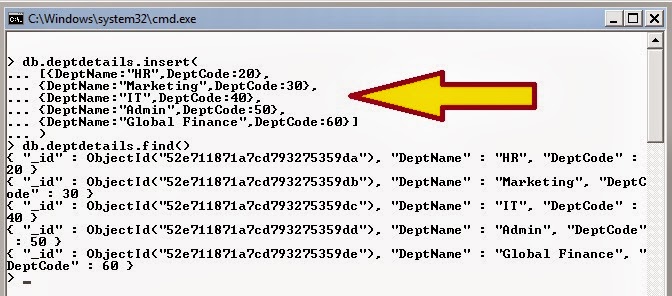
db.deptdetails.insert(
[{DeptName:"HR",DeptCode:20},
{DeptName:"Marketing",DeptCode:30},
{DeptName:"IT",DeptCode:40},
{DeptName:"Admin",DeptCode:50},
{DeptName:"Global Finance",DeptCode:60}]
)

In MongoDB if you want to read about the stats of a collection you can issue db.CollectionName.stats() command. This will show the collection size, number of documents (row), average object size, index size of the collection.

What is MongoDB?
How to get Started with MongoDB
How to create or drop Database in MongoDB?
How to create Collection (Table) in MongoDB?
How to update or save document (Row) in MongoDB Collection (table)?

How to drop Collection (Table) in MongoDB?

This post is next in series of learning MongoDB. We have learned how we can create Collection. In this post we will learn how we can drop the collection.

In MongoDB the first thing we need to do to drop a table is to switch to the database which hosts the collection (table).

use database_name

This will switch the MongoDB control to the database. To drop a collection we need to issue command

db.Collection_name.drop()

If database is successfully deleted it will return "true" or it return "false"

The below example will create a database named "Dept". A Collection "deptdetails" will be created and we will add some document(Row) and finally we will delete the Collection.

> use dept
switched to db dept
> db.createCollection("deptdetails")
{ "ok" : 1 }
> db.deptdetails.insert({DeptName:"Sales",DeptCode:10})
> db.deptdetails.find().pretty()
{
      "_id" : ObjectId("52e6da801a7cd793275359d3"),
      "DeptName" : "Sales",
      "DeptCode" : 10
}
> db.deptdetails.drop()
true
>

What is MongoDB?
How to get Started with MongoDB
How to create or drop Database in MongoDB?
How to create Collection (Table) in MongoDB?

How to create Collection (Table) in MongoDB?

Today, I will share how we can create collection (table) in MonogoDB. Just like in Oracle, SQL Server or any other RDBMS, tables are created before storing data into them; we create Collection in MongoDB to store data.

In RDBMS you issue CREATE TABLE command along with Column names and their data types along with other constraints (Primary key, constraints etc.).

In MongoDB you define collection. You do not need to define column or their data type. In MongoDB each of the rows that you store can have different fields or columns. Unlike with RDBMS MongoDB gives you flexibility of dynamic columns. So for 1 row you may have 5 fields but for second row you can store 10 fields.

In MongoDB you can create collection by two methods. First you can use db.createCollection() method.

You can pass the collection name as a parameter.

db.createCollection(collection_name, options)

In below example, I have created table employeeList by issuing the db.createCollection(“employeeList”) command.

The second method is you can use the db.Collection_Name.Insert() command. The insert() method add a document in the collection. If Collection does not exist then it will create the collection.

To add a single document (row) into a collection (table) we can issue following command.

db.Collection_Name.Insert({Key1:Value1,Key2:Value2, ... KeyN:ValueN})

db.employeeList.insert({EmpName:"Sam Pitroda",Age:25,DOJ:04/04/2011,Salary:2695,Gender:"M"})

To add multiple documents (row), we can issue commands like this

db.employeeList.insert(
    {EmpName:"Anil Shastri",Age:39,DOJ:11/19/2007,Salary:4911,Gender:"M"},
    {EmpName:"Bill Rama",Age:33,DOJ:9/10/2006,Salary:4280,Gender:"M"},
    {EmpName:"John Butler",Age:23,DOJ:12/28/2009,Salary:2612,Gender:"M"},
    {EmpName:"Srini Arya",Age:36,DOJ:12/08/2006,Salary:2316,Gender:"F"} )

To see the list of Collections (tables) in the current database, we can use following command

show collections

What is MongoDB?
How to get Started with MongoDB
How to create or drop Database in MongoDB?

Popular Posts

Real Time Web Analytics