Showing posts with label MongoDB. Show all posts

Wednesday, April 2, 2014

18 Popular GUI for MongoDB

MongoDB is quite popular open source and document oriented database. There are many GUI available to manage, administer, monitor MongoDB. MongoDB GUI are not limited to Desktop based but there are many Mobile apps available to manage, view MongoDB. Today, in this post I will share the list of 18 GUI for MongoDB.

SNo. MongoDB GUI Platform
1.Robomongo Windows
Linux
Mac OS X
2.MongoVUE Windows
3.Genghis Linux
4.Json Studio Linux
Windows
OS X
SmartOS (Solaris x86)

Supported browsers: Internet Explorer
Firefox
Chrome and
Safari.
5.MongoHub Mac
6.WebStorm
7.UMongo Linux
Windows
Mac OS X
8.RazorSQL Windows,
Linux
Mac OS X
9.MongoMonitor iPhone
10.MongoExplorer Android
11.RockMongo Windows
12.NoSQLViewer Windows
13.Nucleon Database Master  
14.mongo3
15.Mongo Express web based
16.28.io  
17.MMS (MongoDB Management Service) Cloud based
18.NBMongo - pluginNetBeans IDE

3 Free Online Tools to learn and Experiment with MongoDB

A Quick Start Guide from RDBMS to MongoDB

E-Books on MongoDB

Wednesday, February 5, 2014

TTL (Time to Live) Indexes in MongoDB

Time To Live or TTL indexes are special kind of indexes which remove the expired documents (rows) from collection (tables) after a fix time. MongoDB provide this feature by which you can create Index which will take care of removing documents (row) after a certain time is passed in the background.

To create a TTL Index the syntax is following:

db.collectionname.ensureIndex ({fieldname:1 OR -1},{expireAfterSeconds: timeinseconds})

For example to create TTL index on empCalendar collection (table) on CreatedOn filed we can write following command. With this, we have created an Index which will start removing all the documents (row) where value in CreatedOn filed will be less than the (current time + 5 minute).

db.empCalendar.ensureIndex({"CreatedOn":1},{expireAfterSeconds: 300})

I created this Index on 4th Feb. As you can see in the below screen we have two documents where value of CreatedOn field is in future. MongoDB will delete all the documents except the two where CreatedOn value is a future date after 5 minutes.

Only two records were left in the Collection (table) after 5 minute.

With TTL Index we can also set a fix time or fix clock after which each of the document will be removed from the Collection.

To understand this let us take an example. We have following data in empCalendar collection.

As you can see each of the documents has their own CreatedOn field which holds a date and time. To create a TTL Index which will remove each of the document in this collection after date and time in CreatedOn is passed, we can issue below command.

db.empCalendar.ensureIndex({"CreatedOn":1},{expireAfterSeconds:0})

There are certain limitations with TTL Index

  • TTL Index can be created on field which stored date values
  • TTL Index cannot be created on multiple fields
  • If a field already has an existing index, TTL index cannot be created on that.
  • The _Id() field does not support TTL Indexes.


Geospatial Index in MongoDB

With MongoDB you can store Geospatial Information i.e. information about location in co-ordinates, longitude and latitude etc. MongoDB allows you to create indexes on Geospatial data.

MongoDB supports two type of Geospatial Index. But, MongoDB allows only one Geospatial Index per collection (table).

1.     2d Indexes
2.     2sphere Indexes

2d Indexes: When the data is stored as legacy coordinate pairs to support planar geometry in the fields, MongoDB allows to create 2d Indexes. To create a 2d sphere Index the syntax is following:

db.Collection_name.ensureIndex({location_field}: “2d”, additional_field: value}, {index-specification options})

2d Sphere Indexes: When the data is stored to support spherical geometry as longitude and latitude in the fields, MongoDB allows to create 2d Sphere Indexes. To create a 2d sphere Index the syntax is following:

Db.Collection_name.ensureIndex({location_field}: “2dsphere”})


Text Indexes in MongoDB

Text Indexes are created on fields (columns) which stores string data. Text indexes can be created on one field (column) or multiple fields (Columns). This index is useful when you are searching in the string data type columns.

MongoDB create only one text index per collection (table). Also, Text indexes are case-sensitive in MongoDB.

Before we create Text Indexes we need to enable the textSearchEnabled. To enable the textSearchEnable we need to issue the following command when we are launching mongoDB.

mongod.exe -dbpath "C:\data" --setParameter textSearchEnabled=true

To create Text Index on a field (column) we can use following command:

db.collectio_name.ensureIndex({field_name:"text"})

For example we have created Text Index on Quotes field in famousQuotes collection (table)

db.famousQuotes.ensureIndex({Quotes:"text"})

To create Text Search Index on all string data type fields (columns) of a collection (table), we can use following syntax:

db.Collection-name.ensureIndex({"$**":"text"},{name:IndexName})

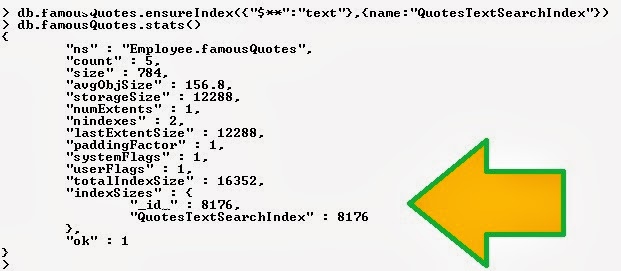
For example the following command will create Text search Index on all string data type fields of famousQuotes collection (table)

db.famousQuotes.ensureIndex({"$**":"text"},{name:"QuotesTextSearchIndex"})


Sunday, January 26, 2014

How to get Started with MongoDB?

To start with MongoDB database you need to download and install the MongoDB database. It is available in two flavors.

   1. MongoDB Enterprise
   2. MongoDB

MongoDB Enterprise is a commercial edition of MongoDB. The current production version for MongoDB Enterprise edition can be downloaded from https://www.mongodb.com/products/downloads/mongodb-enterprise

MongoDB is available for different platforms and version. Depending upon your requirement you can download the MongoDB for Windows, Linux, Mac OS X and Solaris platform. There is 32-bit and 64-bit version of MongoDB available. The current production version available for MongoDB is 2.4.9. You can download the MongoDB from http://www.mongodb.org/downloads

To learn MongoDB you can download the Non-enterprise edition of MongoDB.

To learn how to install and configure the MongoDB on Windows, you can follow this excellent video available on youtube.
http://www.youtube.com/watch?v=QcP4XExUpfA

If you are not interested to download and install MongoDB or you cannot do it on your machine due to any reason, you can go to http://try.mongodb.org/ and start learning MongoDB online. This online source is a great place to start learning MongoDB without installing it.

What is MongoDB?

The word "Database" is not new in IT Industry. Anyone who joins the world of Information Technology comes across the concept of database, DBMS, RDBMS. Oracle, SQL Server, DB2 are some of the most talk about products in Database area.

In recent few years the word “NoSQL” has gain momentum. NoSQL Databases have become very popular in recent times.

For a database professional, the Database industry can be divided into two

   1. RDBMS
   2. NoSQL

RDBMS databases such as Oracle, SQL Server etc. are those which support relation between tables. The data is stored in rows and columns. There are concept of primary key and foreign key. There are joins between two tables. Indexing, transactions, joins, triggers are some of the common features in all these database products.

NoSQL databases are opposite to RDBMS. There are no concepts of tables. Data is not stored in rows and columns. Data is stored in flat files. There are no concepts of relation, joins, complex transactions, triggers etc.

NoSQL Databases can be classified into Keyvalue Database, Document database, Object Database, Tabular database, Multivalue database etc.

MongoDB is a leading open source, document oriented database. This Database is written in C++. It is develop by 10gen.

Some of the leading Document oriented databases are JasDB, CouchDb, ClusterPoint, RavenDB etc. You can find a complete listing here.

MongoDB is a scalable, open source, high performance, document oriented database.

According to Wikipedia the term "Document Database" is defined as following:

A document-oriented database is a computer program designed for storing, retrieving, and managing document-oriented information, also known as semi-structured data.

Why MongoDB?

Why do we need MongoDB? The point is Relational Database has limitation. The major limitation is speed. When the data grows in Terabyets & petabytes the RDBMS performance starts to decrease. The other limitation is it can store structured data only. With the invention of Big Data and Cloud computing the need for performance and to store semi-structured and unstructured data in large volume has grown. MongoDB and similar databases of NoSQL category provides high speed performance and they can store structured and semi-structured data.

MongoDB or NoSQL databases are not replacement of RDBMS Databases such as SQL Server, Oracle, DB2 etc. They cannot replace these databases because the RDBMS design, architecture has its own advantage. In many banking system the use of Transactions are must. NoSQL do not provide support for complex transactions.

MongoDB database do not support following things:

   - Joins between tables
   - Complex Transactions
   - Constraints

MongoDB database provide support for

   - Adhoc queries
   - Index can be created on any field
   - Replicaiton
   - Scalable
   - Cross platform
   - Aggregation
   - File storage

MongoDB database support all platforms. You can run the MongoDB on

   - Windows
   - Linux
   - Mac OS x
   - Solaris

Some of the top companies which are using MongoDB are

   - MTV
   - Craiglist
   - Four Square
   - SAP AG

Here is a very good introductory video from Youtube on MongoDB.


Next: How to get Started with MongoDB

Popular Posts

Real Time Web Analytics