Sunday, September 21, 2025
Wednesday, April 2, 2014
18 Popular GUI for MongoDB
MongoDB is quite popular open source and document oriented database. There are many GUI available to manage, administer, monitor MongoDB. MongoDB GUI are not limited to Desktop based but there are many Mobile apps available to manage, view MongoDB. Today, in this post I will share the list of 18 GUI for MongoDB.
| SNo. | MongoDB GUI | Platform |
|---|---|---|
| 1. | Robomongo | Windows Linux Mac OS X |
| 2. | MongoVUE | Windows |
| 3. | Genghis | Linux |
| 4. | Json Studio | Linux Windows OS X SmartOS (Solaris x86) Supported browsers: Internet Explorer Firefox Chrome and Safari. |
| 5. | MongoHub | Mac |
| 6. | WebStorm | |
| 7. | UMongo | Linux Windows Mac OS X |
| 8. | RazorSQL | Windows, Linux Mac OS X |
| 9. | MongoMonitor | iPhone |
| 10. | MongoExplorer | Android |
| 11. | RockMongo | Windows |
| 12. | NoSQLViewer | Windows |
| 13. | Nucleon Database Master | |
| 14. | mongo3 | |
| 15. | Mongo Express | web based |
| 16. | 28.io | |
| 17. | MMS (MongoDB Management Service) | Cloud based |
| 18. | NBMongo - plugin | NetBeans IDE |
3 Free Online Tools to learn and Experiment with MongoDB
A Quick Start Guide from RDBMS to MongoDB
E-Books on MongoDB
Tuesday, April 1, 2014
Project Management: What are Control Charts Vs Run Charts?
Control Charts and Run Charts are among Severn Basic Tools of Quality. The appearance of control chart and Run Chart are similar so they tend to create confusion some time.
Recently, I see this discussion in a popular PMP Forum. The healthy discussion did inspire me to write the differences and similarity between Control Chart and Run Charts.
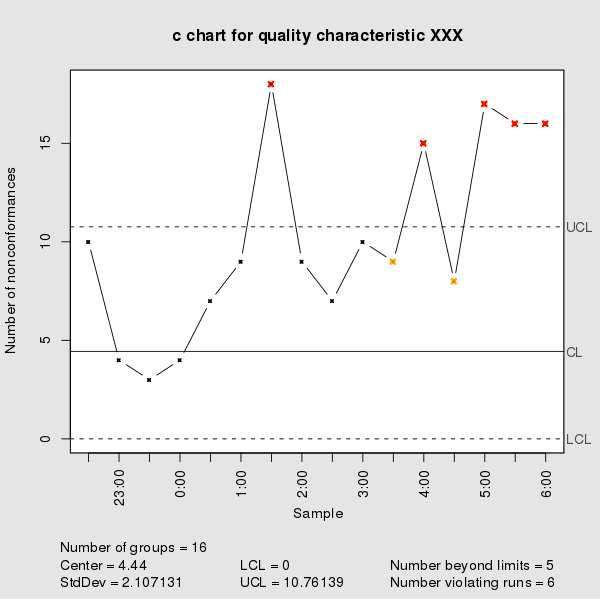
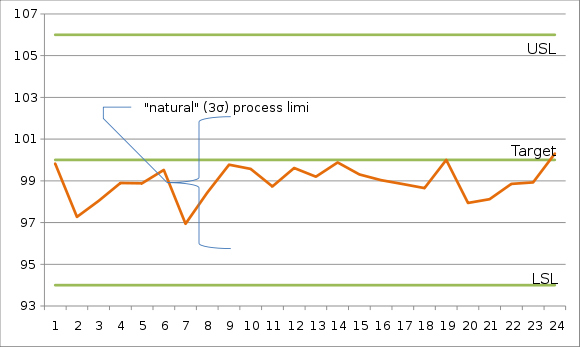
| Control Chart | Run Chart |
| Control Charts are used to check how a process is performing. Control Chart will tell you whether a process is under CONTROL or OUT OF CONTROL. | Run Chart are use to show and depict process trend. It helps to predict future trends. |
| Control Charts has a UCL (Upper Control Limit), LCL (Lower Control Limit), Mean on the chart | Run Chart has only two axis – one axis shows time/time-scale and second axis shows the events. It depicts whether a process is trending upwards or going downwards. |
| Example: ECG reports |
Example: Stock trends, Run rate graph, Error Rate of a employee |
| It is also called "Shewhart Chart" or "Process behavior Chart" | |
| Control Charts were invented by Walter A. Shewhart | |
|
|
Next: What is XMR Chart
Thursday, February 20, 2014
How does SilckLogin works?
Recently Google has acquired the SilckLogin a start-up company in Israel. SilckLogin has been working on alternative for web-Login. The most common system for login is a user id and password. Some of the top websites and financial companies use two layer authentications system.
The first layer is a user id and password. The second layer includes sending SMS code to your Smartphone and ask you to enter the digits to verify it.
SilckLogin system aims to replace this two layer authentication system or in minimum replace the second alternative. You don’t need to type anything to login. Sounds like a cool feature.
So, how does the SilckLogin system works
SilckLogin works on the concept of sound wave. It generates different sound every time you login into the system using SilckLogin. It uses this sound to validate and secure your identity.
To enable SilckLogin on your website you have to include SilckLogin button. To enable SilckLogin button you have to write 5 line of code. What is this 5 line of code is not in public domain yet.

Once user will click or tap on the SilckLogin button; they have to put their Smartphone close to the computer or laptop.
SilckLogin will first verify your position using various protocols such as GPS, Wi-Fi, NFC, QR Code etc. Once your position is verified, SilckLogin patented system will let your computer to generate human inaudible sound. This sound will be captured by the app in your Smartphone.
If your computer or speaker is muted, it will ask you to on it to record the audio.
This sound will be processed and SilckLogin will send a green signal to web server to allow you to login.
Pros:
- No additional hardware is required to implement SilckLogin in your web application
- No new mobile app is required to install on your Smartphone
Cons:
- Internet connection is required on your Smartphone to work with SilckLogin.
SilckLogin is working on a patent which will allow your Smartphone to use the SilckLogin without having an internet connection.
Here is a YouTube video of TechCrunch Disrupt 2013 which shows SilckLogin team presenting the concept of SilckLogin to the world.
Wednesday, February 19, 2014
What is the difference between OPA and EEF?
Organizational Process Assets (OPA) and Enterprise Environmental factor (EEF) are input to many of processes of Project Management.
OPA are Organization’s process, procedures and knowledge base which helps to ensure project success. OPA can be divided into two parts.
Knowledge Base: Every organization has their own knowledge base of Lesson learn, financial database such as labor rates, travel rates, project files, defect history, productivity table etc.
Processes/Procedures: This includes organization standardized processes (related to travel, visa, IT helpdesk etc.), guidelines, templates, organization project management methodologies, project life cycle etc.

Enterprise Environmental factors are surrounding of performing organization. It includes Internal and External factors. Internal factors include Organization style, Organization culture, Organization policies, Organization existing staffs etc. External factors include Market environment, exchange rates, prevailing interest rates, Government policies, regulatory, availabilities of skill resources.

On a general level you can think of OPA as something which is there to help and ensure project success and EEF as something which provides constraint or limitation to the project.
You can visualize "Project's" to operate under "Organizational Process Assets (OPA)" and performing organization OPA’s to operate under "Enterprise environmental factor".

Sunday, February 16, 2014
What is Sunk cost in Project Management?
In Economics Sunk Cost are those cost which has been spend and cannot be recovered. In Project Management area, Sunk cost term refer to cost that has already been incurred and has not produced any value for the project.
For example, you buy a Bike for $20000. You can re-sale you bike but you may not get the original price. That Original Price is Sunk cost.
From project management prospective let us take a practical example.
You decided to hire a supplier for your project and paid some advance money to get started. Due to delay or performance issue you decided to drop the supplier in 10 days. You went on to hire a new supplier for your project. The money that you spent on first supplier is Sunk Cost as this money cannot be recovered and it has been already spent.
Saturday, February 15, 2014
What is an Opportunity cost in Project Management?
In Project Management area, Opportunity Cost term refer to profit or value that you give up by not choosing a project. For example, if you are asked to select one project from three different projects, what you will choose
| Projects | Profit | Duration |
| Project A | $30,000 | 20 weeks |
| Project B | $55,000 | 18 weeks |
| Project C | $65,000 | 21 weeks |
Looking at the profit and time duration you may select Project C over other projects. In that case you will give up Project A and Project B. The profit that you would have earned from Project A ($30,000) and Project B ($55,000) is called “Opportunity Cost”.
Here are some of the videos on Opportunity Cost that you can enjoy from YouTube.
What is Opportunity Cost?
Opportunity Cost: iPhone vs X-Box
Multiple Opportunity Cost
Bank of PMP Questions
Friday, February 14, 2014
MapReduce in MongoDB
MapReduce is one of the approaches to perform aggregate calculation in MongoDB. The other two methods are Aggregate Pipeline and Single Purpose Aggregation. MapReduce as its name says has two functions – map function and reduce function.
If you are aware of functional programming, the map() function is to segregate the elements from a list or segregate rows from a table by applying sorting and filtering. The main aim of map() function is to take each of the document/item from collection/list and convert them into a key, value pair. Thus mapping each document/item with a {key, value} pair.
The aim of reduce() function is take each key, value pair from map function and consolidate all the values by grouping them by key. Next the user defined logic is applied to the consolidate values of each key.
The life cycle of a mapReduce function is shown here.

To show the life cycle of a mapReduce function let us take an example of collection and see how mapReduce works. How data gets segregated and processed during the life cycle.
The table shows data of employee table. We want to see aggregate total of salary paid by each of the department.
|
{ "EmpName" : "Sam Pitroda", "Age" : 35, "Salary" : 3126, "Gender" : "M", "Dept" : 10 } { "EmpName" : "Bill Rama", "Age" : 48, "Salary" : 2270, "Gender" : "M", "Dept" : 10 } { "EmpName" : "Supriay Khanna", "Age" : 32, "Salary" : 3066, "Gender" : "F", "Dept" : 10 } { "EmpName" : "Pappu Kaun", "Age" : 24, "Salary" : 4133, "Gender" : "M", "Dept": 10 } { "EmpName" : "Akshay Kumar", "Age" : 22, "Salary" : 2651, "Gender" : "M", "Dept" : 10 } { "EmpName" : "Anil Shastri", "Age" : 48, "Salary" : 2724, "Gender" : "M", "Dept" : 20 } { "EmpName" : "Ajay Khanna", "Age" : 49, "Salary" : 3711, "Gender" : "M", "Dept" : 20 } { "EmpName" : "Steve Allan", "Age" : 29, "Salary" : 4391, "Gender" : "M", "Dept" : 20 } { "EmpName" : "Jayant Singh", "Age" : 31, "Salary" : 2931, "Gender" : "M", "Dept" : 20 } { "EmpName" : "Saurab Khanna", "Age" : 39, "Salary" : 2566, "Gender" : "M", "Dept" : 20 } { "EmpName" : "John Butler", "Age" : 45, "Salary" : 3622, "Gender" : "M", "Dept" : 30 } { "EmpName" : "Ismail Paun", "Age" : 32, "Salary" : 3608, "Gender" : "M", "Dept" : 30 } { "EmpName" : "Rahul Puri", "Age" : 32, "Salary" : 2111, "Gender" : "M", "Dept": 30 } { "EmpName" : "Srini Arya", "Age" : 30, "Salary" : 3966, "Gender" : "F", "Dept": 40 } |
Input |
|
{ "Salary" : 3126, "Dept" : 10 } { "Salary" : 2270, "Dept" : 10 } { "Salary" : 3066, "Dept" : 10 } { "Salary" : 4133, "Dept": 10 } { "Salary" : 2651, "Dept" : 10 } { "Salary" : 2724, "Dept" : 20 } { "Salary" : 3711, "Dept" : 20 } { "Salary" : 4391, "Dept" : 20 } { "Salary" : 2931, "Dept" : 20 } { "Salary" : 2566, "Dept" : 20 } { "Salary" : 3622, "Dept" : 30 } { "Salary" : 3608, "Dept" : 30 } { "Salary" : 2111, "Dept": 30 } { "Salary" : 3966, "Dept": 40 } |
Map |
|
{ "key" : 10, Values: (3126, 2270, 3066, 4133, 2651)} { "Key" : 20, Values:(2724, 3711, 4391, 2931, 2566,)} {“Key”:30, Values:( 3622, 3608, 2111)} { "Key" : 40, Values:( 3966)}} |
Reduce |
|
{ "_id" : 10, "value" : 15246 } { "_id" : 20, "value" : 16323 } { "_id" : 30, "value" : 9341 } { "_id" : 40, "value" : 3966 } |
Output |
In MongoDB to apply mapReduce() method the syntax is following:
db.collection_name.mapReduce(
map_function() {..., emit(key, value);},
reduce_function(key, value) {..., return (...)},
{out: "output_collection_name"}
To apply mapReduce() to get sum total of Salary of each department we can issue following command on MongoDB shell.
db.employee.mapReduce(
function(){emit(this.Dept,this.Salary);},
function(key,values){return Array.sum(values)},
{
out:"DeptSalary"
}
)


How to get Started with MongoDB
How to create or drop Database in MongoDB?
How to create Collection (Table) in MongoDB?
... More
Wednesday, February 12, 2014
How to run YouTube videos in Slow or fast motion?
YouTube the popular video sharing site from Google has recently launched the trial of running videos using HTML5. HTML5 is the latest markup language which was revised in 2012 by World Wide Web Consortium (W3C). It supports all the latest multimedia and devices.
So, if you are a YouTube user and want to participate in the trial and testing of HTML5 video you need to have a compatible browser for that. The browsers that are supported in this trial are following:
- Google Chrome
- Microsoft Internet Explorer (IE9 onwards, For IE 6/7/8 you need to install Google Chrome Frame)
- Firefox (4 onwards)
- Opera (10.6 onwards)
- Apple Safari
If you have a compatible browser, you can go to http://www.youtube.com/html5 and click on Request the HTML5 player button. This will enable all your videos on YouTube to be run using HTML5 format.
The HTML5 video gives you options to run your video on slow motion or fast motion. For this you need to go to Settings and select Speed from (0.25, 0.5, Normal, 1.5 and 2). Selecting 0.25 will make video to run in slow motion and selecting 1.5 or 2 will run it in fast mode.

If you face any issue playing your video in HTML5 format you can right click on the video and select "Report Playback issue" and provide your feedback to Google YouTube team. To switch back to your default player you can go to http://www.youtube.com/html5 and click on
Use the default player button.
Tuesday, February 11, 2014
How to compare two sheets or files in Ms-Excel?
Many times we are in need to compare data of two Ms-Excel sheets. This is to find out the differences or any discrepancies in data between two sheets. In this post, I will share some of the tools and methods available to compare two sheets in Ms-Excel.
For example purpose let us consider the following excel file with data into two sheets.

Solution 1: Online Tools
www.xlcomparator.net
Xlcomparator.net is a very nice free online tool to compare two sheets. This tool supports Excel 2003, 2007 and 2010 version. You can compare two files of less than 5MB size. Once you upload the file it presents a very neat interface about what you want to compare (which columns, what is source and what is destination, ignore uppercase/lowercase etc.). This tool gives you option to download a file which contains all the mismatch or discrepancies data.

There are other online tools available to compare data between two excel files. Some of them are free and for few you have to pay but you can download the evaluation version to see if it useful for your or not. Some examples are here:
Solution 2: VBA Solution
You can use the following VBA code shared by Graham Stent to compare two sheets. For example I have a excel file with data in two sheets available. The discrepancies data are also highlighted.
I pressed the ALT + F11 to switch to VBA and pasted the below code in Sheet1. I run the UseCompareWorksheets() function and it neatly pointed out the differences in data. You can use the same to compare data in two different excel files as well
Sub UseCompareWorksheets()

'[compare two different worksheets in the active workbook]
CompareWorksheets Worksheets("Sheet1"), Worksheets("Sheet2")


'[compare two different worksheets in two different workbooks]
' CompareWorksheets ActiveWorkbook.Worksheets("Sheet1"), _
' Workbooks("WorkBookName.xls").Worksheets("Sheet2")

End Sub


Sub CompareWorksheets(ws1 As Worksheet, ws2 As Worksheet)

Dim r As Long, c As Integer
Dim lr1 As Long, lr2 As Long, lc1 As Integer, lc2 As Integer
Dim maxR As Long, maxC As Integer, cf1 As String, cf2 As String
Dim rptWB As Workbook, DiffCount As Long

Application.ScreenUpdating = False
Application.StatusBar = "Creating the report..."
Set rptWB = Workbooks.Add
Application.DisplayAlerts = False

While Worksheets.Count > 1
Worksheets(2).Delete
Wend

Application.DisplayAlerts = True

With ws1.UsedRange
    lr1 = .Rows.Count
    lc1 = .Columns.Count
End With

With ws2.UsedRange
    lr2 = .Rows.Count
    lc2 = .Columns.Count
End With

maxR = lr1
maxC = lc1

If maxR < lr2 Then maxR = lr2

If maxC < lc2 Then maxC = lc2

DiffCount = 0

For c = 1 To maxC
    Application.StatusBar = "Comparing cells " & Format(c / maxC, "0 %") & "..."
    For r = 1 To maxR
        cf1 = ""
        cf2 = ""
        On Error Resume Next
        cf1 = ws1.Cells(r, c).FormulaLocal
        cf2 = ws2.Cells(r, c).FormulaLocal
        On Error GoTo 0
        If cf1 <> cf2 Then
            DiffCount = DiffCount + 1
            Cells(r, c).Formula = "'" & cf1 & " <> " & cf2
        End If
    Next r
Next c
'**************************************
' Formating Report for Good visibility
'**************************************

Application.StatusBar = "Formatting the report..."
With Range(Cells(1, 1), Cells(maxR, maxC))
            .Interior.ColorIndex = 19
        With .Borders(xlEdgeTop)
            .LineStyle = xlContinuous
            .Weight = xlHairline
        End With
        With .Borders(xlEdgeRight)
            .LineStyle = xlContinuous
            .Weight = xlHairline
        End With
        With .Borders(xlEdgeLeft)
            .LineStyle = xlContinuous
            .Weight = xlHairline
        End With
        With .Borders(xlEdgeBottom)
            .LineStyle = xlContinuous
            .Weight = xlHairline
        End With
        On Error Resume Next
        With .Borders(xlInsideHorizontal)
            .LineStyle = xlContinuous
            .Weight = xlHairline
        End With
        With .Borders(xlInsideVertical)
            .LineStyle = xlContinuous
            .Weight = xlHairline
        End With

        On Error GoTo 0
End With

Columns("A:IV").ColumnWidth = 20
rptWB.Saved = True

If DiffCount = 0 Then
    rptWB.Close False
End If

Set rptWB = Nothing
Application.StatusBar = False
Application.ScreenUpdating = True
MsgBox DiffCount & " cells contain different formulas!", vbInformation, _
"Compare " & ws1.Name & " with " & ws2.Name
End Sub
Differences were shown neatly in data.

Solution 3: Excel built-in Solution
There is a very good solution provided in MSDN Forum to compare data in two excel files. The solution is to use to copy data into one excel sheet and on a third sheet use the following formula. For the best result you can sort your data before apply the formula.
=SheetName1!ColumnRowNumber= SheetName2!ColumnRowNumber
For the excel file shown above I applied the below formula and it shows True and False for the values where data has matched and not matched respectively
=Sheet1!D1=Sheet2!D1
Solution 4: Excel 2013
If you are using Ms-Office 2013, there is an in-built option to compare two sheets.
Excel 2013 > Menu Inquire > Compare files
I do not have Excel 2013 so I have not tested it
There are other solutions also which uses VLookup, HLookup, IF, Count() function. But it depends on the data and complexity that you have to go with a particular solution.
Monday, February 10, 2014
3 Free Online Tools to learn and Experiment with MongoDB .
Today I am sharing three free online tools that you can use to learn and experiment with MongoDB. You do not need to download or install anything on your desktop or laptop to experiments with these tools. These are available online and all your need is a computer and a good internet connection.
Query Translator
www.querymongo.com

Do MongoDB
http://domongodb.com/mongodbconsole.aspx
This is a great initiative and it is a free online platform to learn and explore MongoDB online. You need to login with your name and email address and it create a database for you. You can explore MongoDB commands and try some of the basic features here.

Try MongoDB Shell
http://try.mongodb.org/
This is an online browser based shell provided by the creator of MongoDB (MongoDB, Inc). It has by default "test" database available. You can learn about creating collection (table), reading data from collection and other basics stuff from here.

If you know any online tool to learn and explore MongoDB which is not listed here; please share with us.
How to get Started with MongoDB
How to create or drop Database in MongoDB?
How to create Collection (Table) in MongoDB?
... More Tutorials on MongoDB here
Saturday, February 8, 2014
How to avoid easy online money making scams?
Money is one thing every one wants to earn. Every one works very hard to earn their money. But this world also has people who are luring others and want to rob their money.
Here is an example. Somehow one of my friend came across this webpage on jobinet.com and asked me is this true?

When I open the web page the headline and very first line told me about that someone is making money in South Carolina and that too in Greenville, SC . This looks me very odd as this is the place I am currently staying on.
I open the source code of this page and did a bit of observation. I came to know the wired and old trick that has been applied on this page.

This page is reading your city and state location and putting that on the webpage using javascript to fool the users. This is a scam and fraud and promoted page. Do not fall prey to these sites.
There are legitimate way to earn money online but don’t fall for easy looking offers.
Let me know what you think about these offers. Thanks!!!
Please visit the Tip section page to read all the exciting tips on Gmail, Facebook, Blogger etc.
Aggregate in MongoDB
Aggregate are use to perform calculation or operation on a group of values from multiple documents (rows). The outcome of an aggregate function is one computed single value.
In SQL Server 2012 a popular RDBMS system we have following aggregate function available.
- AVG
- MIN
- CHECKSUM_AGG
- SUM
- COUNT
- STDEV
- COUNT_BIG
- STDEVP
- GROUPING
- VAR
- GROUPING_ID
- VARP
- MAX
In MongoDB we can perform the aggregate function using three different approaches.
1. Aggregation Pipeline
2. Map-Reduce
3. Single Purpose Aggregation
Aggregation Pipeline
Aggregation Pipeline method is a framework for performing aggregate task. Technically, MongoDB passes the documents (rows) of a single collection (table) through a pipeline. The data is processed in each of the pipe and outcome is handed over to next pipe and at the end the computed result is returned. This approach uses “aggregate()” method provided by MongoDB.
The syntax to use Aggregate Pipeline approach is following:
db.collection_name.aggregate(group_by_field_name, [matching_criteria])

For example let us consider we have following employee data.

To add data into MongoDB we can issue following command on MongodB shell. This will create a employee collection (table) and insert all the documents (rows) into it.
db.employee.insert(
[
{EmpName:'Sam Pitroda',Age:35,Salary:3126,Gender:'M',Dept:10},
{EmpName:'Anil Shastri',Age:48,Salary:2724,Gender:'M',Dept:20},
{EmpName:'Bill Rama',Age:48,Salary:2270,Gender:'M',Dept:10},
{EmpName:'John Butler',Age:45,Salary:3622,Gender:'M',Dept:30},
{EmpName:'Srini Arya',Age:30,Salary:3966,Gender:'F',Dept:40},
{EmpName:'Ajay Khanna',Age:49,Salary:3711,Gender:'M',Dept:20},
{EmpName:'Supriay Khanna',Age:32,Salary:3066,Gender:'F',Dept:10},
{EmpName:'Ismail Paun',Age:32,Salary:3608,Gender:'M',Dept:30},
{EmpName:'Akshay Kumar',Age:22,Salary:2651,Gender:'M',Dept:10},
{EmpName:'Steve Allan',Age:29,Salary:4391,Gender:'M',Dept:20},
{EmpName:'Rahul Puri',Age:32,Salary:2111,Gender:'M',Dept:30},
{EmpName:'Jayant Singh',Age:31,Salary:2931,Gender:'M',Dept:20},
{EmpName:'Saurab Khanna',Age:39,Salary:2566,Gender:'M',Dept:20},
{EmpName:'Pappu Kaun',Age:24,Salary:4133,Gender:'M',Dept:10}
]
)
We will use Aggregate Pipeline approach to read total salary of Dept 10.
$sum
To read sum total of salary for each of the department we can write aggregate function like this:
db.employee.aggregate({$group: {_id:"$Dept", TotalSalary:{$sum : "$Salary"}}})

To read sum total of salary for one specific department (Dept 20) we can write aggregate function like this:
db.employee.aggregate({$group:
{_id:"$Dept",TotalSalary:{$sum : "$Salary"}}},
{$match:{_id:{$lt:20}}})
$avg
To get the average salary of all the departments we can write following aggregate function on MongoDB shell.
db.employee.aggregate({$group:{_id:"$Dept", TotalSalary:{$avg : "$Salary"}}})

$first, $last
To get the Maximum and Minimum salary from each Dept, we can write following command in MongodB shell.
db.employee.aggregate({$sort:{Salary:1}},{$group:{_id:{Dept: "$Dept"},MaxOfSalary:{$first: "$Salary"},MinOfSalary:{$last: "$Salary"}}})

Friday, February 7, 2014
How to check your Facebook Profile No?
Recently Business-Standard a daily newspaper had published this info that Mark Zuckerberg is the fourth user of Facebook. The first three profiles are used for testing purpose. The fourth profile created by Facebook belongs to Facebook CEO.
Here is a small tip on how you can find your own profile number in Facebook.
1. Login to Facebook.
2. Go to your profile page
3. On the addressbar replace "www" with "graph" and press enter

4. It will show your user information in JSON format. This first field is id and it is your Facebook Profile id. Simple!!!

How to download your "Look Back" video from facebook?
Please visit the Tip section page to read all the exciting tips on Gmail, Facebook, Blogger etc.
Thursday, February 6, 2014
How to download your "Look Back" video from facebook?
Facebook has recently launched the Look back video on its 10th b’day celebration. All users have received their look back video. This video compiles your journey from the time you have joined facebook. It shows your first photo, your most liked photo etc.
In case you want to download your Look Back video. Here are simple steps to follow:
You need to have Google Chrome browser for this.
1. Open you Look back video by clicking on the https://www.facebook.com/lookback/ in Google Chrome.
2. Go to Settings->Tools->JavaScript Console
3. Write the below code in the console video
JSON.parse(/\{.*\}/.exec(decodeURIComponent(document.getElementsByTagName('EMBED')[0].attributes['flashvars'].nodeValue))[0]).video_data[0].hd_src
It will show the Video URL.

4. Copy the Video URL and open a new tab and paste the URL in addressbar. Your video will open and you can right click and do Save As to save your video.
How to check your Facebook Ranking No?
Please visit the Tip section page to read all the exciting tips on Gmail, Facebook, Blogger etc.
How to pull List of Indexes in MongoDB?
To see all the indexes attach with a Collection or within a database MongoDB has provided two functions. In this post we will explore these two methods.
getIndexes()
This method is use to see all the indexes define for a collection (table)

System.Indexes
This method is use to see the list of all indexes in the current databases in MongoDB.

How to get Started with MongoDB
How to create or drop Database in MongoDB?
How to create Collection (Table) in MongoDB?
... More
How to rebuild Indexes in MongoDB?
In case you want to rebuild your Index MongoDB provide the reIndex() method to do so. Sometime due to large data insertion or operation we need to rebuild the index. The syntax to rebuild all the index on a collection (table) is following:
db.collection_name.reIndex()
For example to rebuild all the Indexes of scores collection (table) we can issue the following command to MongoDB shell
db.scores.reIndex()

If you want to rebuild one specific index of collection you can use the below syntax:
db.collection_name.reIndex({field_name:1 or -1,field_name2: 1 or -1})
For example to rebuild index Smpname_1_Salary_-1 from employeeList collection we can pass the following command to MongoDB shell:
db.employeeList.reIndex({EmpName:1,Salary:-1})

How to get Started with MongoDB
How to create or drop Database in MongoDB?
How to create Collection (Table) in MongoDB?
... More
How to remove all the Indexes from a MongoDB Collection (table)?
To remove all the Indexes from a collection (table) MongoDB has provided following syntax:
db.collection_name.dropIndex()
To remove one particular index from a collection (table) MongoDB has provided following syntax:
db.collection_name.dropIndex({field_name:Sorting_order(1 or -1))
For example to drop index “scores” from scores collection (table) we can issue following command:
db.scores.dropIndex({“score”:1})

What is MongoDB?
How to get Started with MongoDB
How to create or drop Database in MongoDB?
How to create Collection (Table) in MongoDB?
... More
Sparse Indexes in MongoDB
MongoDB provide flexibility of dynamic fields (columns) for each of the document (row). Unlike in RDBMS or DBMS system where each row has fixed set of columns. In MongoDB each of the documents (row) can have their own set of columns. So it is not mandatory that the two rows will have same columns. This is the beauty of NoSQL database MongoDB.
Sparse Indexes are special kind of indexes which stores references of only those documents (rows) which include the index field. So, if rows do not have the field which is marked in Sparse Index it will not be part of the Index. This saves a lot of disk space.
The syntax to define Sparse Index is following:
db.collection_name.ensureIndex( { Fieldname: 1 or -1 }, { sparse: true /false} )
For example, we have created collection (table) named "Productivity" where documents (rows) have different field. Some documents (rows) do not have Manufacturer field.

Now we will create a Sparse Index on Manufacturer field. We can do this by passing following command.
db.Products.ensureIndex({Manufacturer:1},{sparse:true})

How to get Started with MongoDB
How to create or drop Database in MongoDB?
How to create Collection (Table) in MongoDB?
... More
Wednesday, February 5, 2014
TTL (Time to Live) Indexes in MongoDB
Time To Live or TTL indexes are special kind of indexes which remove the expired documents (rows) from collection (tables) after a fix time. MongoDB provide this feature by which you can create Index which will take care of removing documents (row) after a certain time is passed in the background.
To create a TTL Index the syntax is following:
db.collectionname.ensureIndex ({fieldname:1 OR -1},{expireAfterSeconds: timeinseconds})
For example to create TTL index on empCalendar collection (table) on CreatedOn filed we can write following command. With this, we have created an Index which will start removing all the documents (row) where value in CreatedOn filed will be less than the (current time + 5 minute).
db.empCalendar.ensureIndex({"CreatedOn":1},{expireAfterSeconds: 300})
I created this Index on 4th Feb. As you can see in the below screen we have two documents where value of CreatedOn field is in future. MongoDB will delete all the documents except the two where CreatedOn value is a future date after 5 minutes.

Only two records were left in the Collection (table) after 5 minute.

With TTL Index we can also set a fix time or fix clock after which each of the document will be removed from the Collection.
To understand this let us take an example. We have following data in empCalendar collection.

As you can see each of the documents has their own CreatedOn field which holds a date and time. To create a TTL Index which will remove each of the document in this collection after date and time in CreatedOn is passed, we can issue below command.
db.empCalendar.ensureIndex({"CreatedOn":1},{expireAfterSeconds:0})
There are certain limitations with TTL Index
- TTL Index can be created on field which stored date values
- TTL Index cannot be created on multiple fields
- If a field already has an existing index, TTL index cannot be created on that.
- The _Id() field does not support TTL Indexes.
How to get Started with MongoDB
How to create or drop Database in MongoDB?
How to create Collection (Table) in MongoDB?
... More
Popular Posts
-
 Mobile Payment is combination of technologies. These technologies include Mobile Wallet providers, Mobile Technology providers, Banking, So...
 -
3 Free Online Tools to learn and Experiment with MongoDB MongoDB Basics What is MongoDB? How to get Started with MongoDB How...
-
What is PEGA? What is New in PEGA 7? What is BPM? How to setup PEGA PRPC system in your local machine What are WorkType an...
-
GMail Tips How to create an archive copy of all your email or selected Gmail labels? How to check your Gmail account was hack...
-
SSIS: How to extract/unzip files to a folder using 7-Zip? SSIS: How to run command Line program and pass arguments to it? ...
-
YouTube API with .NET How to get started with YouTube API? How to pull top rated videos list from YouTube? How to pull region/coun...
-
What is Big Data? What is Hadoop? What is HDFS? What is Rack in Hadoop Cluster? Big Data: Tools and Technologies
-
 Big Data and Cloud – these two words are talk of IT Industry town in last few quarters. All the major players of IT word such as Amazon ( A...

