Control Flow and Data Flow are two basis elements for SSIS. Conceptually these two are different. An SSIS developer spends most of his time dealing with these two elements.
Where the Control Flow and Data Flow are located?
If you are working with SQL Server 2005/SQL Server 2008/SQL Server 2008R2/SQL Server Denali (CTP 3), you will find these two tabs whenever you choose to create or open an existing Integrations Services Project in SQL Server Business Intelligence Development Studio.

What is Control Flow and Data Flow?
Before we begin let us know what these two elements are:
Control Flow:
- Control Flow controls the project/package flow based on task completion, success or task failure.
- In a control flow Task 1 needs to complete before task 2 begins
- Smallest unit of the control flow is a task
- Control flow does not move data from task to task
- Tasks are run in series if connected with precedence or in parallel
- Package control flow is made up of containers and tasks connected with precedence constraints to control package flow

Data Flow:
- Data Flow deals with the Data.
- Unlink control flow, multiple components can process data at the same time
- Smallest unit of the data flow is a component
- Data flows move data, but there are also tasks in the control flow, as such, their success or Failure effects how your control flow operates
- Data is moved and manipulated through transformations
- Data is passed between each component in the data flow
- Data flow is made up of source(s), transformations, and destinations.
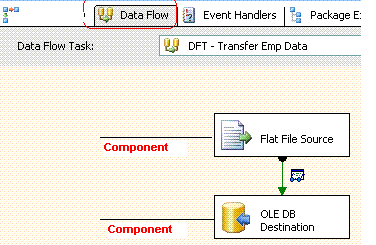
So Data Flow is the child of Control Flow. A Control Flow may or may not require a Data Flow.
We will discuss some more basic concepts of SSIS in future posts...till then ...please feel free to add your comments.
We will discuss some more basic concepts of SSIS in future posts...till then ...please feel free to add your comments.
Related Article:
- SSIS: Read public data of Twitter Users?
- SSIS: How to pull Currency Rates from European Central Bank
- SSIS: How to pull Tweets from Twitter?
- SSIS: How to read Excel Meta Data?
- SSIS: How to resolve Excel Import 255 character Truncation issue?
- SSIS: Read and Export Excel data from nth Row
- SSIS: How to pull Stock Quotes from Google Finance
- SSIS: How to load data into SQL table from Google Spreadsheet?
- SSIS: How to Download images from Picasa album?
- SSIS: How to Load images into Picasa web album?
- SSIS: How to Load XML search result from Search engines like Bing, Google etc?
- SSIS: How to generate HyperLink in Excel output?
- SSIS: How to Compress/Zip your file using 7-Zip?
- SSIS: What is CheckPoints?
- SSIS: Checkpoints implementation
- SSIS: Event Handlers
- SSIS: Data Flow v/s Control Flow


